Showing posts with label rendering. Show all posts

Wednesday, January 19, 2011

Video: How To Render Wireframes In Maya


How to render wireframes in maya and export them as vectors.
Watch Now...

Tuesday, January 26, 2010

Camera Tip

Maya cameras work very similarly to real-world cameras. So, like in the real world, in Maya we can change our focal length. Different focal lengths can greatly affect the way an image looks. The standard focal length in Maya and real-world cameras is 35. Here's a rendering with the focal length set to that:
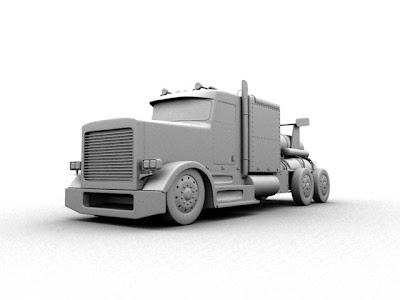
Go to window>outliner, select the camera you're going to be rendering from, go to window>attributes editor and, under camera attributes, you'll find the focal length attrubute.

In this rendering, I set the focal lengtht to 20:
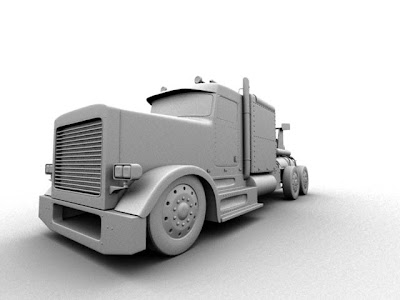

You'll notice that you'll need to dolly in your camera because the scene will appear to get smaller. This is because it is working similarly to a wide-angle lens. This will let you see more in the scene. Also, objects closer to the camera will look abnormally larger than objects in the distance.

In this rendering, I set the focal length to 60:
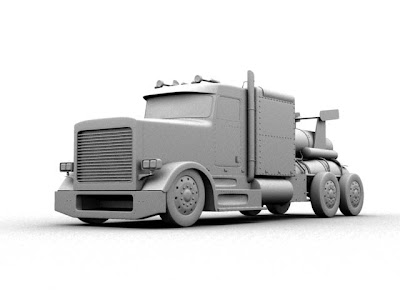
This gives you a zoom lens effect, so, when you increase the setting, you'll want to dolly your camera away from the object. This also makes objects in the distance look the same size as objects close to the camera.

When using different focal length, it changes the way a model will look. It will be quite drastic sometimes. With the focal length at 60, it shows the front and back of the truck evenly. But, when it's set at 20, it will be focusing more on the grill and front headlight.

Wednesday, October 21, 2009

New Tutorial! How Shaders Work In Maya


This tutorial teaches you how materials work, and how to create materials in Maya.
http://www.3dtutorialzone.com/tutorial?id=107
Read More...

Sunday, August 16, 2009

New Tutorial! Creating A Halftone In Maya


This tutorial will teach you how to create a halftone pattern effect inside Maya.
http://www.3dtutorialzone.com/tutorial?id=92
Read More...

Monday, August 10, 2009

New Tutorial! Render Layers


This tutorial is the last part of a 2 part series on display layers and render layers in Maya.
http://www.3dtutorialzone.com/tutorial?id=88
Read More...

Thursday, July 30, 2009

Monday, July 27, 2009

New Tutorial! Modeling A Toy Dragonfly Part four


This tutorial series covers how to model, texture, and render a toy dragonfly. This part of the tutorial series will cover texturing and rendering.
http://www.3dtutorialzone.com/tutorial?id=78
Read More...

Friday, July 24, 2009

New Blog tutorial! Rendering HD Resolution

How to render HD resolution

Step one - Go to window>rendering editors>render settings.

Step two - In the render settings window, go to image size and set the presets to HD 720 (half HD), or HD 1080 (full). Rendering with this resolution will cause render time to increase.

Tuesday, July 21, 2009

New Tutorial! Shadows

This tutorial covers how to make shadows in Maya.
This is part of a beginner's learning guide for Maya. Tutorials in this series are short but cover a single topic in each one.
http://www.3dtutorialzone.com/tutorial?id=71
Read More...

New Tutorial! Lights


This tutorial covers the basic light attributes in Maya
This is part of a beginner's learning guide for Maya. Tutorials in this series are short but cover a single topic in each one.
http://www.3dtutorialzone.com/tutorial?id=73
Read More...

Monday, July 20, 2009